
SaaS internal linking is the practice of connecting pages within your SaaS website to distribute authority, guide users through the buyer journey, and signal to search engines which pages deserve to rank.
I’ve audited hundreds of SaaS sites over ten years as an SEO strategist. The same pattern keeps showing up: companies invest in backlink campaigns while their existing content sits there with authority that goes nowhere useful.
The authority you need is already on your website. You just haven’t distributed it correctly.
In this guide, I walk you through the internal linking strategy I use for my SaaS clients, the mistakes I see most often, and the tactics that move the needle.
Key Takeaways
- Internal links pass authority from high-traffic posts to conversion pages.
- Topic clusters are the foundation of every strong SaaS internal linking strategy.
- Orphaned bottom-of-funnel (BoFu) pages are the biggest quick win in any SaaS SEO audit.
- Anchor text diversity matters—don’t use the same anchor for two different pages.
- Run a full internal link audit every quarter, not only when something breaks.
What Is Internal Linking for SaaS?
Internal linking for SaaS tells search engines which pages matter, how they relate to each other, and the order users should visit them.
A SaaS website carries a much broader page taxonomy as it includes blog posts, feature pages, integration pages, use case pages, pricing pages, comparison pages, and landing pages. Each one serves a different role in the buyer journey, and each one needs a deliberate internal link strategy.
Pages with more internal links generally have higher PageRank, which can contribute to better rankings. The reason is straightforward—internal links act as votes from within your own domain. The more votes a page receives, the more authority it accumulates in Google’s eyes.
For SaaS brands, this matters in a specific way. Your feature and integration pages rarely earn natural backlinks because nobody writes roundups of “Top 10 CRM Feature Pages to Bookmark.”
Your blog posts, on the other hand, do attract links. So your blog becomes the source of authority, and your product pages need to become the destination. Understanding that flow is where every strong SaaS internal linking strategy starts.
The best practices for internal linking on SaaS sites all follow this logic: map your link equity sources, identify your highest-priority destinations, and build deliberate pathways between them. Generic advice about adding more links misses the point entirely.
Why Is Internal Linking Important for SaaS SEO?
Internal linking is important for SaaS SEO because your highest-converting pages, like features, integrations, and use cases, rarely earn natural backlinks. Internal links are the only reliable way to pass authority to them. Moreover, SaaS buyers take longer to decide, and internal links guide them from blog posts to demos or pricing without losing them to competitors.
Let me explain that in detail.
The bottom-of-funnel problem
Feature, integration, use case, and comparison pages drive the majority of SaaS conversions. These pages almost never attract backlinks organically.
I’ve run SaaS link building campaigns for clients where blog posts accumulated strong domain authority while the product pages sat at zero. Without internal links routing that authority toward conversion pages, you end up with a site that ranks for informational queries and doesn’t convert.
The best practices for internal linking for SaaS websites all prioritize one outcome: route link equity to your bottom-of-funnel pages. Everything else follows from that.
The buyer journey problem
SaaS buyers take a long time to convert. Your content needs to guide users from awareness to consideration to decision without losing them along the way.
Internal links are the mechanism for that guidance. A blog reader who clicks an internal link to a relevant integration page sits four steps closer to a trial signup than one who hits the back button. Each click you facilitate is a step toward revenue.
The crawl efficiency problem
Large SaaS sites routinely have hundreds of pages. Without strong internal linking, Google’s crawlers miss important pages entirely. According to Google’s own Search documentation, internal links are one of the primary ways Googlebot discovers and indexes new content.
I’ve worked with SaaS clients where 40% of their product pages had zero internal links pointing at them. Google couldn’t find those pages without a direct URL. That’s a site architecture failure that internal linking fixes.
If you want expert help with your SaaS link strategy, check out my SaaS SEO service, and let’s talk.
What Types of Internal Links Does a SaaS Site Need?

SaaS sites use four distinct types of internal links that are listed below:
- Navigational links
- Contextual links
- CTA links
- Breadcrumb links
1. Navigational links

Navigational links appear in your website’s header and footer. They stay visible on every page of your site, which means Google treats them as strong signals of page importance.
Here’s the rule I follow:
Your header and footer must include your core bottom-of-funnel SaaS pages, such as Features, Use Cases, Pricing, and Integrations. These pages rarely earn external backlinks, so giving them permanent navigational links is one of the fastest ways to push authority toward them.
Most SaaS sites waste their header on generic labels like Product or Solutions that point to overview pages. Put your specific high-value pages there instead.
2. Contextual links
Contextual links sit inside the body copy of your SaaS content. These are the most powerful internal links for SEO because they carry surrounding context that helps Google understand the relationship between the source page and the destination.
Use these to move readers from informational blog posts to relevant product pages. A post covering “how to manage remote sprint planning” must link directly to your sprint planning features page, not your homepage.
The placement matters too. Links in the top half of your content get more clicks and carry more weight than links buried at the bottom.
3. CTA links
CTA links appear at the end of an article or section and drive readers toward a specific action, such as booking a demo, starting a trial, or visiting a comparison page.
Think of these internal SaaS links as the handoff point. A reader who made it to the end of your article is warm. A strong CTA link with specific, benefit-driven anchor text turns that reader into a lead. “Start your free project management trial” converts far better than “click here.”
I recommend including at least two CTA links in every piece of content. I always place one after the conclusion and before the FAQ and one in a relevant section of the article in the first half of the content.
4. Breadcrumb links

Breadcrumb links sit at the top of a page and show users the path they followed to get there. For example, Home > Features > Time Tracking > Automatic Time Logging.
For large SaaS sites with deep page hierarchies, breadcrumbs are critical. They give Google a clear picture of your site structure and pass authority upward through the hierarchy. They also reduce bounce rate because users who feel lost on a deep page can navigate back without hitting the back button.
If your SaaS website has more than four levels of page depth, and most do, breadcrumbs are non-negotiable.
How to Build a SaaS Internal Linking Strategy
Here are the internal linking strategies for the SaaS SEO framework I use for every new client:
Step 1: Map your page priority tiers
Before you add a single link, build a priority map as follows:
- Tier 1: Core conversion pages (pricing, features, use cases, demo, integrations, comparison pages).
- Tier 2: High-authority informational content (blog posts with external backlinks).
- Tier 3: Supporting cluster content (subtopic posts, how-to guides, glossary entries).
Your job is to route authority from Tier 2 to Tier 1, with Tier 3 feeding both.
Here’s something I rarely see done by SaaS websites: Treat your highest-traffic blog posts as “link equity banks.”
Make a deliberate decision about which conversion page each post spends its equity on. This is not a random process. Every high-authority post should have one primary Tier 1 destination, and that link needs to appear in the first half of the content where readers are still engaged and crawlers weight the signal most heavily.
Step 2: Build topic clusters
The topic cluster model is the structural backbone of SaaS internal linking. A hub page covers a broad topic in depth. Cluster pages dive into specific subtopics. Each cluster page links back to the hub and forward to a relevant conversion page.
Here’s a real example from a SaaS business I worked with. We built a hub page around “project management for remote teams.” Cluster pages covered “async communication tools,” “sprint planning software,” and “time tracking for distributed teams.” Every cluster page linked to the hub and to the specific features page that matched the subtopic.
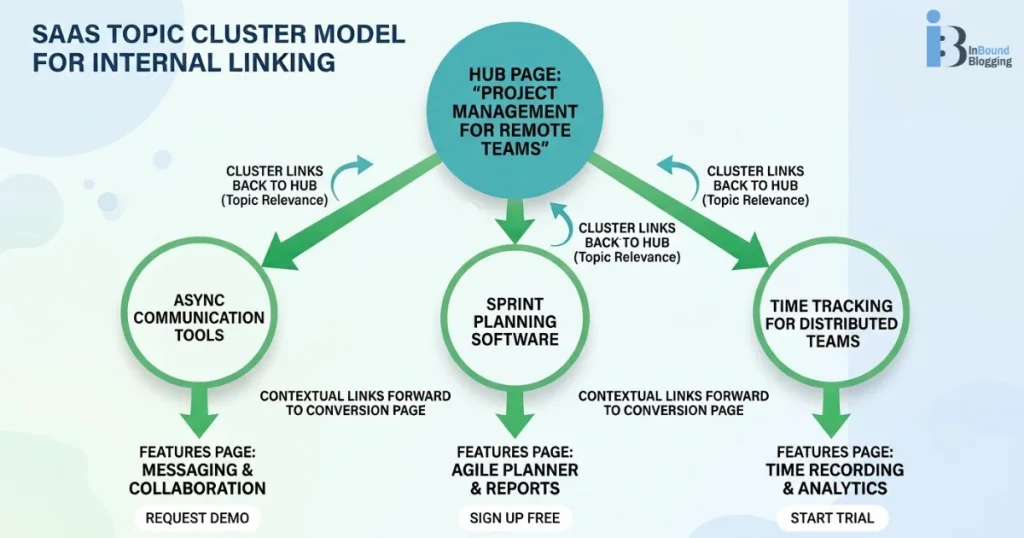
Within six months, the features page ranked on page one for three target keywords where it previously had no ranking position at all.
Step 3: Audit your existing authority
Open Ahrefs and pull the “Best by Links” report. This shows you which pages on your site currently hold the most external link authority.
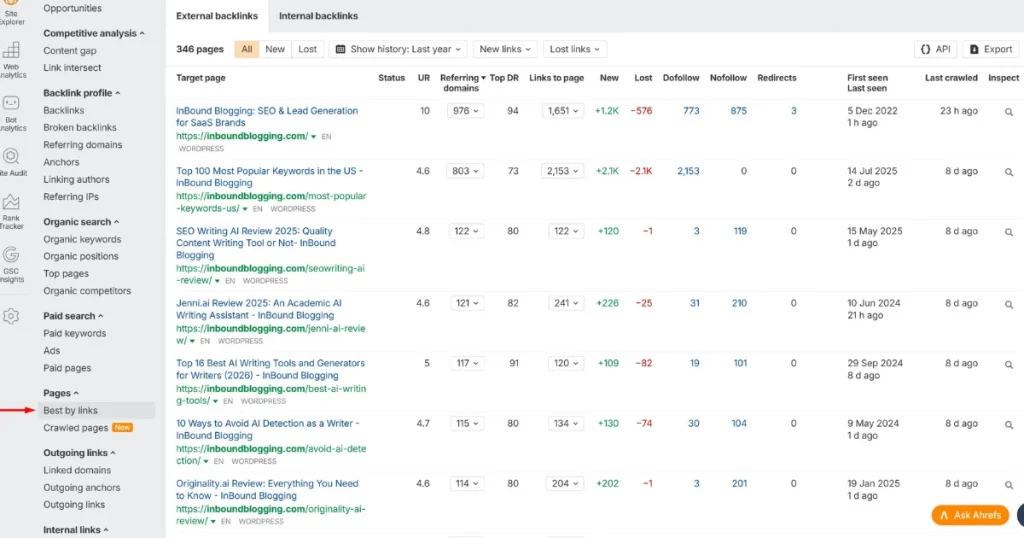
Now ask one question: Where are those pages currently sending their internal links?
In my experience, most SaaS blogs send internal links to other blog posts or to the homepage. They almost never link to integration pages, use case pages, or pricing pages. That’s a massive waste of earned authority. Fix those links first. The impact often shows in Google Search Console within four to six weeks.
Step 4: Fix orphaned pages
An orphaned page has zero internal links pointing to it. Google’s crawler struggles to find these pages, and they accumulate almost no authority regardless of content quality. SaaS sites often accumulate orphaned pages when new feature pages launch without internal links to them from existing blog content.
Use Screaming Frog or Ahrefs to pull a full list of your orphaned pages. Sort them by page type. Any orphaned Tier 1 page is a priority emergency. Add internal links from at least three relevant Tier 2 pages before doing anything else.
Step 5: Build internal linking into your content process
Don’t leave internal link decisions to writers. Include specific internal link instructions in every content brief that include the anchor text, destination URL, and placement within the article. This turns internal linking from an afterthought into a repeatable system with consistent results.
How to Choose Anchor Text for SaaS Internal Links
The best practices for internal linking in SaaS blogs agree that anchor text is a relevance signal, not a label.
Here’s how I pick anchor texts for SaaS sites I work on:
- Keep anchors 2–5 words long and descriptive.
- Include a target keyword from the destination page when it fits naturally.
- Don’t use “click here,” “read more,” or “learn more”.
- Don’t use the same anchor text for two different destination pages; this creates cannibalization signals that confuse Google.
- Vary anchor text for the same destination page across different articles.
Here are SaaS-specific examples comparing weak and strong anchor text:
| Weak Anchor | Strong Anchor |
|---|---|
| Click here | SaaS project management features |
| Learn more | compare enterprise CRM pricing |
| Read this | agile sprint planning integrations |
As a SaaS link building expert with a decade of experience, I can share this insight:
Treat internal anchor text with the same care you give anchor text in your external link building campaigns. The relevance signal works the same way. If you treat internal anchors as navigational labels, you leave SEO value sitting on the table.
How to Audit Your SaaS Internal Links
A SaaS internal linking audit starts with using SaaS SEO tools to find broken links and orphaned pages. You must also re-audit the links after every product launch or site migration.
The best practices for internal linking of SaaS websites include regular, structured reviews rather than reactive fixes after something breaks.
Here’s the cadence I recommend when auditing internal links:
- Monthly: Check for broken internal links using Screaming Frog, Ahrefs, or Google Search Console.
- Quarterly: Full structural audit covering orphaned pages, anchor text diversity, and link equity distribution across page tiers.
- After every product launch or site migration: Full re-audit immediately, because new SaaS pages often launch as orphans and migrations regularly break redirect chains.
Tools I use for SaaS internal link audits:
- Screaming Frog: Full site crawl, orphaned page detection, broken link identification
- Ahrefs: Authority distribution, best-by-links report, link equity flow visualization
- Google Search Console: Crawl errors, indexed pages, click-through data by page
- Semrush: Internal link scoring, page authority gaps, competitive analysis
What to look for in every audit of internal SaaS links:
- Tier 1 pages that lack internal SaaS links from other pages.
- High-authority blog posts sending all their link equity to the homepage.
- Pages with more than 100 internal links pointing at them (equity dilutes across too many destinations).
- Generic anchor text on links to important pages.
- Redirect chains where an internal link hits a 301 before reaching the destination (this loses a portion of the equity in every hop).
- Conversion pages buried more than three clicks from the homepage—internal links alone cannot fix a site architecture problem where key pages live five levels deep.
What Are the Most Common Internal Linking Mistakes SaaS Sites Make?
Based on my experience, these are the most common internal linking mistakes SaaS websites make:
- Linking only within blog content: Blog-to-blog links are fine, but if you never link from SaaS blog posts to product, integration, or use case pages, you leave conversion authority untouched.
- Using the same anchor text for multiple destination pages: Two pages competing for the same anchor text create cannibalization. Google gets confused about which page to rank for that phrase, and both pages suffer.
- Ignoring integration and comparison pages: These pages sit in the most competitive SaaS search territory. They need strong internal authority to compete.
- Launching product pages as orphans: Every time a SaaS company adds a new feature page, it often launches with zero internal links pointing to it. It sits for months with no authority and no rankings while existing blog posts link to everything else.
- Link stuffing in short content sections: Dropping eight links into a three-sentence paragraph destroys readability and dilutes each link’s equity to almost nothing. Three to five contextual links per 1,000-word section is the right range.
- Relying on “Related Posts” widgets as a substitute for strategic linking: These widgets sit in the footer area of your content, carry less contextual weight, and point to posts based on tags rather than strategic priority. They complement your strategy but aren’t a strategy on their own.
My Final Thoughts
SaaS internal linking delivers some of the highest SEO returns, and it costs no additional budget. Look at what you already have on your site and route the authority you’ve earned toward the pages that drive revenue.
Follow my simple process for properly linking a SaaS site internally:
- Start with the audit.
- Fix your orphaned Tier 1 pages first.
- Build your topic clusters.
- Add internal linking instructions to every content brief.
Do that consistently, and your bottom-of-funnel pages will start climbing in rankings without new backlinks.
Ready to take your SaaS SEO further? Work with my team at InBound Blogging to build a link strategy that drives real pipeline.
FAQ
How many internal links should a SaaS blog post include?
Three to eight contextual internal links per post is the right range, depending on length. For a 2,000-word post, I aim for four to six. Relevance matters more than volume.
Is internal linking on-page or off-page SEO?
Internal linking is on-page SEO. It involves optimizing links within your own domain, not earning links from external sites.
What is the difference between internal linking for SaaS vs. ecommerce?
eCommerce sites prioritize linking to product and category pages for purchase intent. SaaS sites prioritize feature, integration, and use case pages that guide a much longer buying decision involving multiple stakeholders. The funnel is longer, and the page taxonomy is more complex, so the strategy needs to be more deliberate.