
While pillar posts cover all of the aspects of a topic you’d want to rank for from a search engine optimization (SEO) perspective, they’re not as in-depth as a typical blog post.
Instead, these content solutions essentially introduce the various sub-topic elements with broader information, while enticing customers to click through to connected pages to learn more.
If used poorly, pillar pages can end up as cluttered, complicated, and overwhelming portions of your website. However, when leveraged correctly, they can be an excellent way to boost audience engagement, demonstrate thought leadership, and strengthen SEO.
Keep reading to discover more and learn about important ways to create your own pillar pages.
Pillar Pages [Key Takeaways]
- Pillar pages create structure. They serve as comprehensive hubs linking related content, enhancing site navigation and SEO.
- Choose topics that are broad enough to encompass multiple related blog posts, ensuring a cohesive content cluster.
- Conduct thorough keyword research to identify subtopics and long-tail keywords for effective clustering and SEO.
- By offering valuable, centralized information, these pages improve the user experience and keep visitors engaged longer.
- Regularly updating pillar pages keeps content relevant and maintains their status as evergreen resources.
- A well-executed pillar strategy showcases expertise and can improve search engine rankings, establishing thought leadership.
What Is a Pillar Page?

Pillar pages are long, meaty, and complex posts, brimming with useful and actionable information. They often include a combination of text and images, and may even link out to audio files to help you answer important audience questions.
Sometimes called a “knowledge base article” or “cornerstone content,” pillar posts get their name from the architectural structure: pillars. In architecture, pillars are columns that provide crucial support for structures. A pillar post offers similar benefits to your content marketing or blogging, providing a clear structure on which you build out extra articles and blogs.
A pillar page is the basis on which topic clusters are built. The pillar page covers all of the aspects of a specific topic on one page while leaving room for more in-depth articles via cluster blog posts connected to the page.
What is a topic cluster?
A topic cluster is a content strategy that involves organizing website content around a central theme or subject, a.k.a a pillar page. This core page broadly covers the main topic and links to various subtopics, or cluster content, which provide more detailed information on specific aspects.
The internal linking structure helps search engines understand the relationship between these pages, improving site authority and SEO. This approach enhances user experience by offering clear pathways to in-depth, related content, ultimately boosting search visibility and engagement.
So, topic clusters are collections of relevant content connected to an overarching idea. If you wanted to create a pillar page on designing a WordPress website, this page might include various sections covering how to choose your host, select a WordPress theme, and configure your content. Each section would link out to another page on your website that covered the topic in greater detail.
Benefits of Pillar Pages for Improving Search Engine Rankings

Pillar pages aren’t just about organizing your content to make it easier for customers to navigate your website. They’re also incredibly useful for improving your SEO. Although Google doesn’t directly state that pillar posts have an impact on your ranking, these tools can positively affect traffic in several ways. For example, they:
- Improve your site structure: To understand your content, Google’s algorithm considers many different pieces of content at once. If you have a lot of content, your pillar posts will unify similar subjects to create a convenient hierarchal map that’s easier to crawl.
- Help you rank for high-volume keywords: Pillar pages can be more likely to rank for competitive keywords thanks to their broad topic coverage. Users who search for “general” information are usually looking for broader coverage of a topic, which means your pillar pages will match this intent. The long-form nature of the posts also means that you can cover more long-tail keywords without making your content seem spammy.
- Generate backlinks: Because pillar pages are so comprehensive (and hopefully valuable), they can also help generate various authority-driven backlinks for your website. This means you’ll be able to increase your PageRank and pass this along to the internal cluster links within your posts.
- Enhance user experience: Pillar pages provide a centralized hub where users can find a wealth of related information, which enhances user experience by making it easier to navigate complex topics. This streamlined access to comprehensive content can keep users engaged on your site longer, reducing bounce rates and increasing the likelihood of conversions.
- Facilitate content updates and management: Maintaining and updating content becomes more manageable with pillar pages as they serve as a central point for connecting various related articles. By updating the pillar page, you can ensure that all linked content stays relevant and up-to-date, which is crucial for maintaining the accuracy and quality of your site’s information.
- Increase internal link value: With a well-structured pillar page, you create opportunities for strategic internal linking, improving how link value is passed across your site. This can enhance the authority of your cluster content, giving each linked piece a better chance to rank and drive traffic back to your main pillar page, creating a cycle of growing authority and visibility.
Pillar pages also help to showcase your expertise, which makes you more likely to be considered an authority by both Google and your customers. Creating such pages is a fantastic opportunity to show just how much you know about a specific topic, so you can earn credibility.
Types of Pillar Pages
There is variety in the world of pillar pages and you can opt for one or several options. Here are some of the most common ones to pick from:
- Resource pages: Act as comprehensive directories on specific topics, providing essential links to tools, articles, and references. They are ideal for compiling both your own and third-party resources to deliver extensive value to readers.
- How-to guides: Offer detailed instructional content on performing tasks or solving problems, often linking to subtopics for deeper exploration. These are particularly useful for showcasing expertise and supporting various skill levels.
- What-is or definition pages: Provide thorough explanations of key terms or concepts, offering context and background to aid understanding. They usually include links to specialized articles that explore specific aspects in greater detail.
- Topic overviews or ultimate guides: Deliver broad, all-encompassing coverage of a subject, serving as foundational anchors for more detailed cluster content. These guides typically combine text, visuals, and related links to provide full-spectrum insight.
How to Create Your Own Pillar Content: Steps and Best Practices
Creating your own pillar page content can be a little more complex than writing a standard blog post. However, it can be an excellent way to boost the value of your website and strengthen your internal linking strategy. The steps involved in creating pillar content are relatively straightforward; it all starts with figuring out your topic clusters and working from there.
Step 1: Decide on a topic
The first step in creating a pillar page is deciding what topic you want to rank for. Look for relatively broad terms that will require coverage from multiple blog posts.
The first step in creating a pillar page is deciding what topic you want to rank for. Look for relatively broad terms that will require coverage from multiple blog posts.
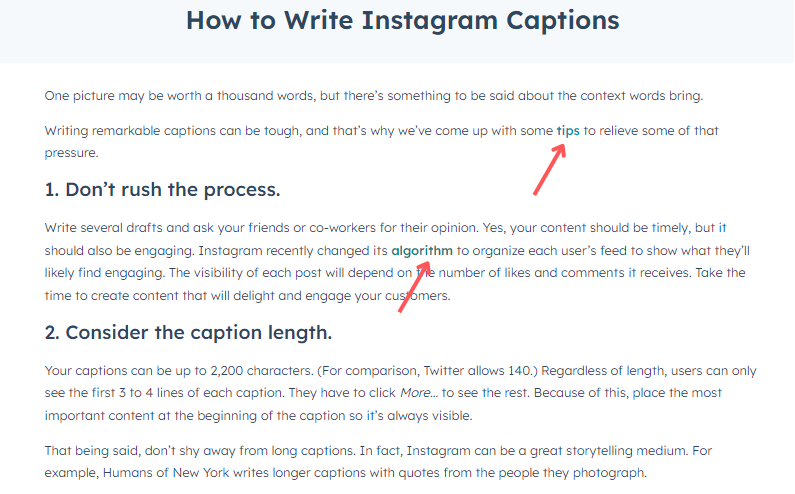
For example, if you wanted to write about “social media,” this topic alone would be too broad. However, “Instagram ads” would be too narrow. A pillar page on “Instagram marketing” and all of its various forms is just broad enough for a pillar page.
Here’s an example from HubSpot, with links to relevant content included:
Step 2: Conduct keyword research
Once you have your broad topic in mind for your pillar page, it’s time to start diving into your keywords. Keyword research helps you identify which specific subtopics to cover with your individual blog posts linking to your pillar page.
For instance, if you were writing a pillar page on WordPress statistics and facts, you might research keywords related to “WordPress” to see which areas you should focus on. The idea is to create a range of sub-topics for your pillar post that answer the key questions your customers have about your topic. Think about your customer personas, their pain points, and their customer journey.
You can also use traditional keyword search tools like Answer the Public and Google Search Console to help expand your list of ideas.
Step 3: Write your cluster pages
Once you have a list of the cluster page subtopics you’re going to include in your pillar page, it’s worth writing those blogs first. This ensures that you’ll have plenty of existing content to link to when you publish your pillar page. It also means that you can create a pillar page much faster because you’ll already have more in-depth content you can summarise on your larger page.
You can use your blog posts as research for your pillar page, adding useful information from those articles into the main post without “cannibalizing” too much of the content. Remember, you still want to offer something unique and useful on each cluster page.
Step 4: Write your pillar page
Next, it’s time to design your pillar pages. There are a few styles of posts that work best on such pages. For instance, you can create a “comprehensive guide,” like Ahrefs does here with its Search Engine Optimization Guide:

Or you could opt for a listicle, where you list a number of key topics related to an overarching theme. Here’s a good example from the Yoga Journal, listing all the various types of yoga poses in a convenient directory:

Guides are ideal for generating thought leadership and improving your internal linking strategy, while listicles offer a fantastic way to provide easy-to-follow information for customers. Lists can also be a good way to monetize your blog posts because you can link out to affiliate partners and promoters.
As you draft your pillar pages, focus on keeping your subtopics short so you can elaborate on the ideas you cover further in your cluster pages. However, at the same time, make sure you’re providing enough information to make the central pillar post relevant and valuable to the reader.
Step 5: Optimize and regularly update your pillar pages
Finally, start optimizing your pillar page for on-page SEO factors. This means making sure you include your primary keyword in the subheadings and page title and create a strong title tag and meta description. You should also:
- Use headers for each subtopic
- Incorporate primary and long-tail keywords throughout the page
- Include your main keyword in the first 100 words
- Ensure your content matches your customer’s search intent
- Write readable, easy-to-scan text that’s legible for users
- Optimize images and add appropriate alt-text
- Add clear and strong calls to action (CTAs)
Once you’ve optimized your pillar pages, come back and update them regularly. Pillar pages can be an excellent evergreen content source, but only if you ensure the information provided is up-to-date. Coming back and adding to your pillar pages is a good way to remind Google that your post is still up-to-date. Plus, it gives you a chance to expand your pillar pages with more topic clusters over time.us, it gives you a chance to expand your pillar pages with more topic clusters over time.
Pillar Page Examples: What Does a Pillar Page Look Like?
Pillar pages are essentially an all-in-one overview or guide about a specific topic, with links to different ideas you can expand on further in other blog posts.
Imagine you wanted to create a pillar page around the elements of Productivity apps, like HubSpot does here. Your pillar page could be a list of the most popular productivity apps, with sections for different styles of productivity tools, such as:
- Time management apps
- Personal apps
- Workplace apps
- Voice-to-text apps
- Meeting apps
- Writing and note-taking apps
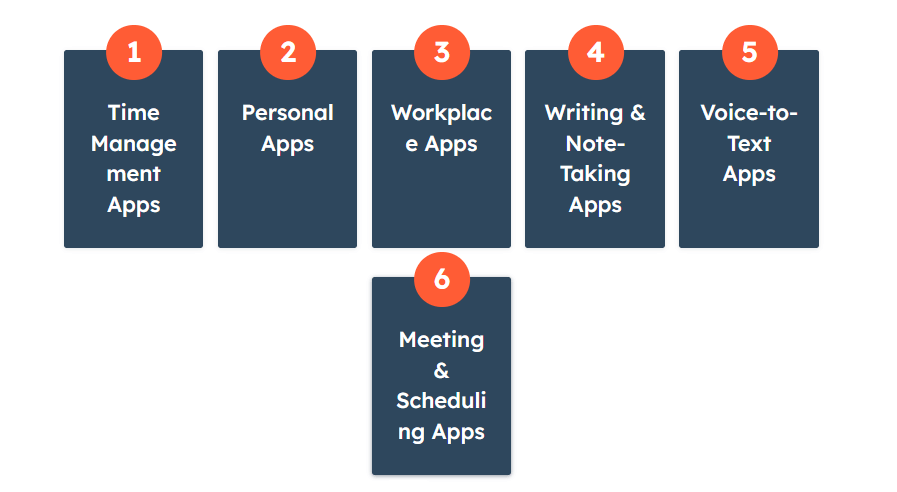
You’d start by creating the cluster pages related to each of these sections, then build your pillar page around those cluster topics. In each cluster topic, you’d link back to the pillar post and each pillar page would link to all of your cluster topics.
Here’s another pillar page example to consider, from The Atlantic. The “Population Healthier” page covers a number of important topics about health and wellness, with links to additional owned and sponsored content produced by the brand.

Elsewhere, Tarakeet published a pillar page all about the topic of SEO strategy. This page includes more than 5,600 words covering various sub-topics like ecommerce SEO for product pages, competitive analysis, keyword research, and how to leverage technical SEO.
As you scroll through each section of the pillar page, you’ll find graphics, banners, downloadable materials, and links to other cluster pages.
Conclusion
Pillar pages can be a powerful and useful tool for businesses with a good content strategy. If you produce a lot of blog posts, your pillar posts will help to organize your content and strengthen your chances of ranking high on search engines.
Master the art of these pages, and you’ll be able to present yourself as an authoritative thought leader in the eyes of your audience while enhancing your position on Google.